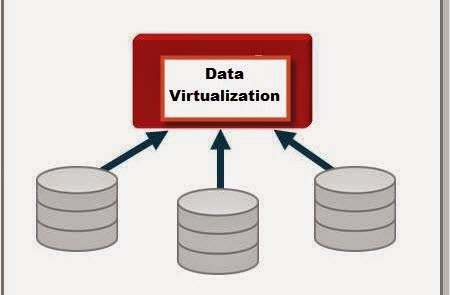
With companies/business having different types of data marts/datawarehouses there is a fear that these could become independent silos and could not provide value to the business as a whole. There has been lot of resources(Time,Money,People) being invested in building a datawarehouse/data marts. The business would like to get value from the disparate datawarehouses/data marts, so the concept that has been in play for quite a while is Data Virtualization. Data Virtualization could be defined as process of building a agile data layer for easy data access and delivery. This is also sometimes referred to as the data abstraction layer so that users can get access to data quickly. Having defined Data Virtualization, where does one use this concept: Here are some of the situations where Data Virtualization could be used.
1. Data Federation - Scenario: A application requires data from multiple incompatible data sources.
(Example: Federated Views, Virtual Data Marts)
2. Data Warehouse Extension: The Datawarehouse does not contain the required data to create reports (Example: Datewarehouse Extension)
3. Data Virtualization - Build a Agile Data layer for easy data access.
4. Big Data Integration: How to combine Big Data with traditional data for analysis (Example: Hadoop)
5. Cloud Data Integration: Need to integrate systems on site with the Applications running in the cloud (Example: SaaS Application Integration)
Based on the scenario and type of question we are trying to answer, Data Virtualization could be a solution. The concepts described here were based on a article related to the Composite , a data virtualization/Integration tool from Cisco (http://www.compositesw.com/data-virtualization/).
Showing posts with label SQL Server 2008 R2. Show all posts
Wednesday, April 23, 2014
Wednesday, February 19, 2014
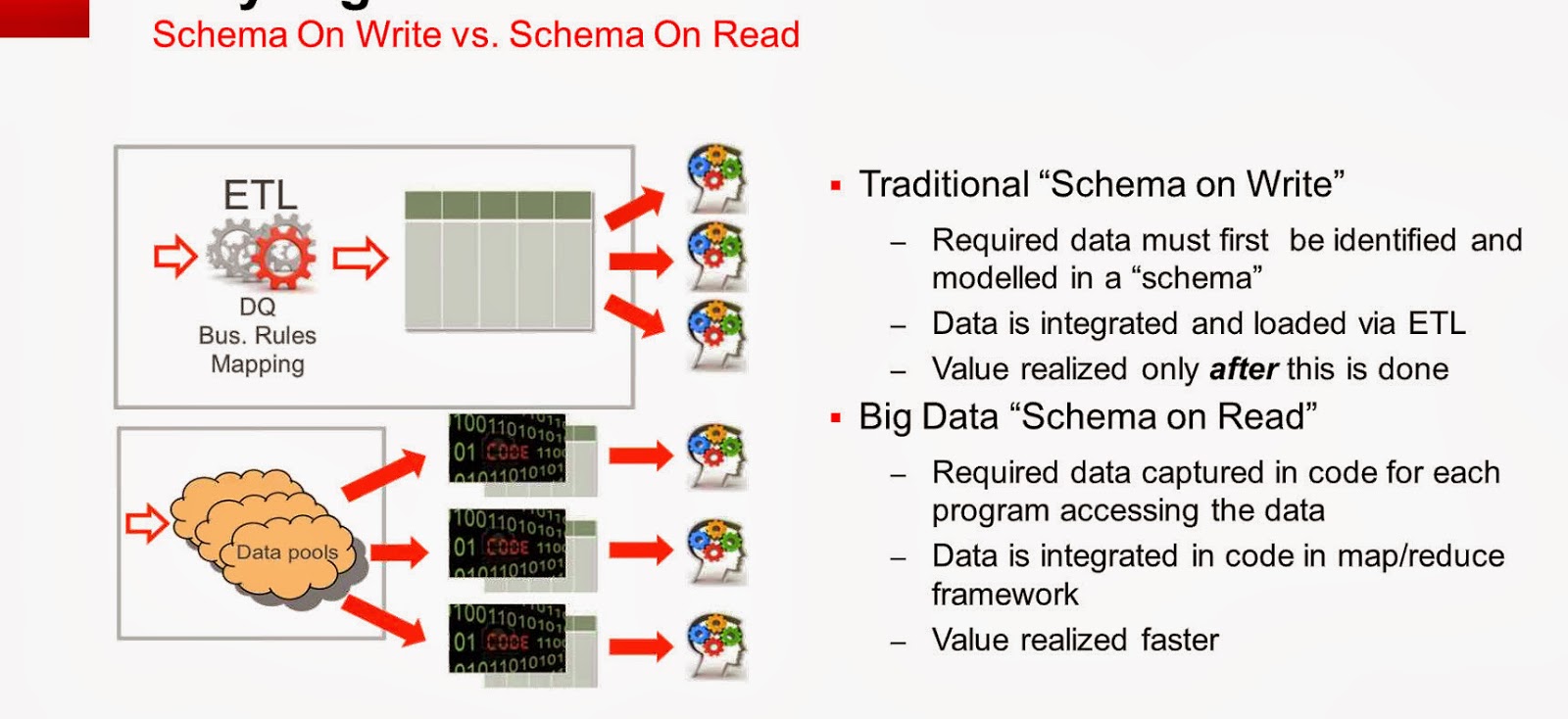
Schema on Read vs Schema on Write...
There are more and more case studies/examples of Big data implementations. Big data is not suitable for all scenarios. Where Big data concepts are applicable, it is important to know the difference between:
Schema on Read and Schema on Write: The differences between the two was captured from a presentation/discussion on Big data by Oracle. Regardless of SQL Server or oracle the concept described below is very important to understand.
The main focus on the difference between the 2 is that when is the value realized faster, of course there could be debates surrounding this concept.
Schema on Read and Schema on Write: The differences between the two was captured from a presentation/discussion on Big data by Oracle. Regardless of SQL Server or oracle the concept described below is very important to understand.
The main focus on the difference between the 2 is that when is the value realized faster, of course there could be debates surrounding this concept.
Tuesday, February 4, 2014
JOINS (Hash,Merge,Nested Loop)
As a developer one definitely would have encountered performance issues with queries run on SQL Server database. Queries that were working during the initial design phases start to slow down once projects are deployed to production. There could be several factors affecting the performance of a query, it is essential for one to understand the execution plans generated by the sql server optimizer. It is important to know what types of joins are being utilised by the optimizer and why. The joins referred to in this article are related to Hash, Merge and Nested Loop joins. The focus is on what happens behind the scenes when INNER JOIN/ OUTER JOIN queries are executed. In order to see the execution plan, one use the Include Execution Plan option in SSMS, once the query is completed, the Execution Plan is displayed in the results tab. Now lets look at what each of the joins mean.
MERGE JOIN: Match rows from two suitably sorted input tables exploiting their sort order.
HASH MATCH(Hash Join): Using Input row from the top input table to build a hash table, and each row from the bottom input table to probe into the Hash table, outputting all matching rows.
NESTED LOOP: For Each row in the top(outer) input, scan the bottom (inner) input , and output matching rows.
The following article might be dated, but it has a very relevant information with a test performed with different data set sizes and indexes: This article was written by Muthukkumaran kaliyamoorthy.
http://www.sqlserverblogforum.com/2011/10/merge-join-vs-hash-join-vs-nested-loop-join/
One can take the examples provided in the article and try to apply it to one's database and see the difference in execution plan. The difference in the joins chosen by the optimizer depends on the data size, indexes of each table involved in the join. Hope the referenced article helps developers to figure performance issues related to joins and enhance the queries better.
MERGE JOIN: Match rows from two suitably sorted input tables exploiting their sort order.
HASH MATCH(Hash Join): Using Input row from the top input table to build a hash table, and each row from the bottom input table to probe into the Hash table, outputting all matching rows.
NESTED LOOP: For Each row in the top(outer) input, scan the bottom (inner) input , and output matching rows.
The following article might be dated, but it has a very relevant information with a test performed with different data set sizes and indexes: This article was written by Muthukkumaran kaliyamoorthy.
http://www.sqlserverblogforum.com/2011/10/merge-join-vs-hash-join-vs-nested-loop-join/
One can take the examples provided in the article and try to apply it to one's database and see the difference in execution plan. The difference in the joins chosen by the optimizer depends on the data size, indexes of each table involved in the join. Hope the referenced article helps developers to figure performance issues related to joins and enhance the queries better.
Monday, December 16, 2013
Bulk Copy/Bulk Insert - Data Sourcing
Recently I have been working on a project which invloves Data being sourced to SQL Server. As part of the handshake between the source and target SQL Server System, A log file had to be read to get information regarding how many records were pushed to different tables as required by the Project. As part of consuming the log file text information into a table in sql server, I was using BULK INSERT command which was working fine. One fine day the process of data sourcing failed, because the logic in the job could not identify the rowcounts present in the Log file content. As I dug deeper I found out that the Log file data was getting internally ordered by a timestamp value present in the begining of each line, this internal sorting was happening because of the BULK INSERT command. The issue was that when the Day crossed from 11:59 PM to 12:01 AM, the contents of the log file in the table got jumbled up, this caused the ordering source to be distorted. As part of a alternative solution we tried using BCP to consume the Log file (text file content) into the table, also one of the main issue that was crucial for us was to maintain the ordering present in the log file and not tamper with that sequencing. When we built the BCP solution, in order to be absolutely sure that we are reading the file in a forward fashion is to use the parameter, [-b batch_size] as part of the bcp command. By Default BCP will consume the file (source log file) as one big batch. Since we wanted to maintain the ordering of the log file, i set the batch size to 1, so the parameter -b 1 was added to the bcp command which was used to source the log file. Once this was set, the log file contents were read into the table in sql server one line at a time and the ordering of the log file at source was maintained. This helped my process to find out the counts from the log file and validate the data in the target. It was kind of challenging to figure out the data being sorted and also use bulk data import tools to read the source data one record at a time, the performance was not affected as the log file was not huge. It is also important test as much as possible when one is trying to integrate/source from another system.
Tuesday, December 10, 2013
Data Integration-Data Readiness
Currently I have been working on lot of Data Integration projects, this involves lot of sourcing of data from various system. While sourcing data one of the key aspects to find out if data is ready at source. There are also situations where some other systems could be using your system as a source. In both of the situations it is very important to come up with a Data Readiness strategy. It is extremely important to have a good sourcing strategy since there are SLA's that are to be met and the Business needs data more than ever before to make good decisions. What is involved in Data Readiness? The source systems need to come up with a plan to have data readiness indicators once all the objects/tables have been updated. In my projects the Data Readiness is table driven, normally there is a table which would have the following attributes:
DatabaseName
Date
Schema
TableName/Object
CompletedFlag
LoadStartDate
LoadEnDate
UpdateDateTime
SLATime
When the source tables are updated with data and all the data related operations are complete, there would be a process to update the DataReadiness table which update all the above attributes and set the CompleteFlag Indicator = 'Y'. The Systems which would need data from the source would keep polling the DataReadiness table to check the CompletedStatus and also the UpdateDatetime. The reason to check the UpdateDatetime column is to make sure that the system that is pulling data from the source is trying to get the most recent update on the source system. The Data Readiness layer allows a level of abstraction in the sense that systems requiring data need not check individual source tables. The Data Readiness table can be used to indicate when the jobs need to be run to pull the actual data. In case Target systems are lagging behind with respect to the data update, the Data Readiness layer can be used to catch up with the latest updates on the source systems.
DatabaseName
Date
Schema
TableName/Object
CompletedFlag
LoadStartDate
LoadEnDate
UpdateDateTime
SLATime
When the source tables are updated with data and all the data related operations are complete, there would be a process to update the DataReadiness table which update all the above attributes and set the CompleteFlag Indicator = 'Y'. The Systems which would need data from the source would keep polling the DataReadiness table to check the CompletedStatus and also the UpdateDatetime. The reason to check the UpdateDatetime column is to make sure that the system that is pulling data from the source is trying to get the most recent update on the source system. The Data Readiness layer allows a level of abstraction in the sense that systems requiring data need not check individual source tables. The Data Readiness table can be used to indicate when the jobs need to be run to pull the actual data. In case Target systems are lagging behind with respect to the data update, the Data Readiness layer can be used to catch up with the latest updates on the source systems.
Wednesday, January 26, 2011
Rename .MDF File...
I have been working on a project where the database files had to be rename. The name of the files had to be consistent with the database. Initially I detached the database, renamed the files in Explorer, then tried to re-attach the database, I was getting an error. I came across the following steps (thanks to MSDN news groups) and implemented them, the renaming of the database worked well. This was done on SQL Server Version 2008 R2. In the example the db.mdf and db.ldf file will point to the newly named files.
Note: The following feature does not work in SQL Server 2000.
ALTER DATABASE databaseName SET OFFLINE
GO
ALTER DATABASE databaseNAme MODIFY FILE (NAME =db, FILENAME = 'C:\Program
Files\Microsoft SQL Server\MSSQL.2\MSSQL\Data\db.mdf')
GO
--if changing log file name
ALTER DATABASE databaseNAme MODIFY FILE (NAME = db_log, FILENAME =
'C:\Program Files\Microsoft SQL Server\MSSQL.2\MSSQL\Data\db.ldf')
GO
--Before you set the database online , you would have to manually change the filename at the OS level.
--Failing on this part will not let you to start up the database.
ALTER DATABASE databaseName SET ONLINE
GO
Note: The following feature does not work in SQL Server 2000.
ALTER DATABASE databaseName SET OFFLINE
GO
ALTER DATABASE databaseNAme MODIFY FILE (NAME =db, FILENAME = 'C:\Program
Files\Microsoft SQL Server\MSSQL.2\MSSQL\Data\db.mdf')
GO
--if changing log file name
ALTER DATABASE databaseNAme MODIFY FILE (NAME = db_log, FILENAME =
'C:\Program Files\Microsoft SQL Server\MSSQL.2\MSSQL\Data\db.ldf')
GO
--Before you set the database online , you would have to manually change the filename at the OS level.
--Failing on this part will not let you to start up the database.
ALTER DATABASE databaseName SET ONLINE
GO
Tuesday, August 31, 2010
Shared Datasets...
There is a new feature in SQL Server 2008 R2 called Shared DataSets. In prior versions of reporting services one would create datasets to get the desired results/output. In cases where same datasets had to be used in different reports, one had to re-create the datasets. This situation comes up when you have the same parameters in different reports. In SQL 2008 R2, one can create shared datasets or convert a regular dataset to a shared dataset. The pre-requisite for creating a shared dataset is that it has to be done on a shared datasource. Once share datasource has been created, one can create a shared dataset or convert a normal dataset to a shared dataset. The shared dataset can be deployed like a shared datasource, shared datasets gives us improved maintainability. For a more detailed overview, click on the following link:
Prologika Forums:
http://prologika.com/CS/blogs/blog/archive/2009/11/16/shared-datasets.aspx
Prologika Forums:
http://prologika.com/CS/blogs/blog/archive/2009/11/16/shared-datasets.aspx
Friday, August 27, 2010
SQL Server 2008 R2 Trial Version...
Recently I downloaded the evaluation version of SQL Server 2008 R2, the 32 bit version. I installed all the components like Integration Services,Reporting Services and Analysis services. The installation went of smoothly without any issues. I was interested in checking out the new features in the reporting services/ report builder 3.0. There are new data visualization features which have been added. Follow this link to download the evaluation version and look for more SQL Server 2008 resources.
http://www.microsoft.com/sqlserver/2008/en/us/R2Downloads.aspx
Subscribe to:
Comments (Atom)