
Tuesday, September 20, 2011
SSIS Multicast...
One of the features available in SSIS data flow tasks is the Multi cast Transform. This allows us to make multiple copies of data which is fed into the Multi cast task. This task takes in a single input and the Multi cast task makes multiple copies of data available as the output, it is like xerox copy machine. Each of the outputs coming out of Multi task transform can be used in different ways in the sense that one output can be sent to a archive database destination, another output could be transformed into other forms of data. One of the uses which i have come across is where we need to push the production data down to different test/development environments, this type of package is really handy for DBA's.


Tuesday, September 13, 2011
List of SSIS Packages...
In this post i wanted to highlight the availability of a standard report which lists all the SSIS packges stored in SQL Server. This report was generated in SQL Server 2005. First Connect to the Integration Services using SSMS 2005, this would bring up the object explorer, in the object exploer expand the Stored packages folder. Under this folder there is a Subfolder called MSDB, right click on the sub folder and select Reports and proceed to select standard reports. Under the Standard reports, choose general. This will generate a standard report as shown below:
The first column displays the extension of the SSIS package, which is dtsx.

The first column displays the extension of the SSIS package, which is dtsx.

Friday, September 9, 2011
Fuzzy Lookup...SSIS...
Recently I was working on a project where in there was a requirement to check the quality of data before uploading the data to SQL Server. There are a couple of tasks in the Data flow component of SSIS which allow one to scrubb the input data. The two tasks which are available are Fuzzy Lookup and Fuzzy grouping tasks. The data source for the SSIS package had a text file which contains a list of contacts that need to be scrubbed and uploaded to the database. The contact text file could have names that are misspelt or have bad characters. As per the business there can certain set of tolerance and confidence level set based on which the misspelt records could be uploaded or rejected. This is where the fuzzy lookup task comes into play. I have enclosed a sample Fuzzy Lookup editor:


In this SSIS package, the records which have a valid lookup contact in the database is sent through the Fuzzy lookup task. The output of fuzzy lookup task can then be directed to a conditional split task. There are certain columns which are in built in the fuzzy lookup that are available to the conditional split task,they are _Similarity and _Confidence. Based on the values of these two variables and business rules records can be inserted or rejected from being uploaded to the database.


In this SSIS package, the records which have a valid lookup contact in the database is sent through the Fuzzy lookup task. The output of fuzzy lookup task can then be directed to a conditional split task. There are certain columns which are in built in the fuzzy lookup that are available to the conditional split task,they are _Similarity and _Confidence. Based on the values of these two variables and business rules records can be inserted or rejected from being uploaded to the database.

Wednesday, September 7, 2011
SQL Server Denali (11)...
There are some neat enhancements in SQL Server Denali with respect to the Data Warehousing/BI spectrum. The SSIS Server is going to be enhanced in a major way, there is going to be Self Service SSRS feature, there is going to be a feature called Column Store which is a new type of index, this feature is expected to accelerate queries in a datawarehouse. There is a project named Apollo where in this feature is discussed in detail. Look for the technical article :
Columnstore Indexes for Fast Data Warehouse Query Processing in SQL Server 11.0.
There has been a set of SQL Server Developer Tools Code Named "Juneau" which has been release by microsoft. Here is a breif description:SQL Server Developer Tools, Codename "Juneau" transforms database development by introducing a ubiquitous, declarative model that spans all the phases of database development and maintenance/update. One can go to the following link to check it out:
http://northamerica.msteched.com/topic/details/DBI376-HOL?fbid=T3Bixb0H50m#showdetails
Columnstore Indexes for Fast Data Warehouse Query Processing in SQL Server 11.0.
There has been a set of SQL Server Developer Tools Code Named "Juneau" which has been release by microsoft. Here is a breif description:SQL Server Developer Tools, Codename "Juneau" transforms database development by introducing a ubiquitous, declarative model that spans all the phases of database development and maintenance/update. One can go to the following link to check it out:
http://northamerica.msteched.com/topic/details/DBI376-HOL?fbid=T3Bixb0H50m#showdetails
Wednesday, August 31, 2011
Loading Mutliple Files (Contd..)
I had mentioned in my previous post on how to handle auditing of multiple files. While auditing the file loads, the name of the file loaded is stored in a sql server table once the data flow is completed successfully.
Within the For Each Loop Container, I added a execute sql task after the data flow task. The execute sql task takes in the user defined variable sFileName and passes it as a parameter to an INSERT statement. This can be modified into a stored procedure in case there need to be more details added about the file loaded. Once the execute sql task runs it inserts the value of the user defined variable into a table. The table can be queried to find out what files have been loaded successfully. I have included the image of the Control Flow below.
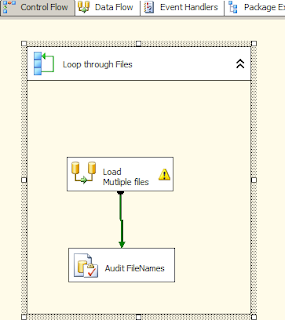 The name of the execute sql task is Audit FileNames.
Within the For Each Loop Container, I added a execute sql task after the data flow task. The execute sql task takes in the user defined variable sFileName and passes it as a parameter to an INSERT statement. This can be modified into a stored procedure in case there need to be more details added about the file loaded. Once the execute sql task runs it inserts the value of the user defined variable into a table. The table can be queried to find out what files have been loaded successfully. I have included the image of the Control Flow below.

Monday, August 29, 2011
Loading Multiple files...
Recently I came across a scenario where in i had to load multiple excel files into a database table in sql server.The excel files reside in a folder from where these files need to be loaded into a sql server table. At first i worked on the data flow task where i import one excel file into the table. The reason being i need to build out the connection string for the excel source. I dragged a Excel source to the data flow task editor and a OLE Db destination data source. I set the source folder and the file for the excel source and also choose the first row has column names option.

This sets the connection for the excel source like this:
Provider=Microsoft.Jet.OLEDB.4.0;Data Source=C:\Ramdas\SSIS\Sheet1.xls ;Extended Properties="EXCEL 8.0;HDR=YES";
Once the excel source is set, connect it to the destination and do the required mappings for the destination table. Test the data flow task to make sure the data from a single excel can be imported.
In the Control flow editor, create a string variable called sfilename of type string and set the value of this to the excel file with the path (In this example: "C:\Ramdas\SSIS\Sheet1.xls), make sure the scope of the variable is at the package level.

Drag an For Each Loop Container, make sure the data flow task is inside the container. Edit the For Each Loop Container, choose the ForEach file enumerator in the Collection window, choose the file path and choose the option Full qualified under retrieve file name. In the variables section choose the variable sFilename and set the index to 0.

In the Data Flow task editor, right click on the Excel Connection Manager,Choose Properties, within the properties choose Expressions. In the Expressions dropdown Choose connection string. In the expression editor window copy and paste the Connection String of Excel connection manager, replace the fully qualified name with the user defined variable. The expression should be like the following:
"Provider=Microsoft.Jet.OLEDB.4.0;Data Source=" + @[User::sFilename]+" ;Extended Properties=\"Excel 8.0;HDR=YES\";"

The backslash in this expression is critical since they are the escape characters. When the evaluate expression is clicked the following statement should appear:
Provider=Microsoft.Jet.OLEDB.4.0;Data Source=C:\Ramdas\SSIS\Sheet1.xls ;Extended Properties="Excel 8.0;HDR=YES";
Once the expression is tested, click ok.
Now going back to the Control Flow the ForEach Container can be executed and multiple files within the source folder would be loaded to the database. In order to make sure that multiple files are loaded one can create an other table in the sql server database and capture the value in the user defined variable into a table.
I would like to thank the author of the blog,Matthew Roche: http:\\bi-polar23.blogspot.com.

This sets the connection for the excel source like this:
Provider=Microsoft.Jet.OLEDB.4.0;Data Source=C:\Ramdas\SSIS\Sheet1.xls ;Extended Properties="EXCEL 8.0;HDR=YES";
Once the excel source is set, connect it to the destination and do the required mappings for the destination table. Test the data flow task to make sure the data from a single excel can be imported.
In the Control flow editor, create a string variable called sfilename of type string and set the value of this to the excel file with the path (In this example: "C:\Ramdas\SSIS\Sheet1.xls), make sure the scope of the variable is at the package level.

Drag an For Each Loop Container, make sure the data flow task is inside the container. Edit the For Each Loop Container, choose the ForEach file enumerator in the Collection window, choose the file path and choose the option Full qualified under retrieve file name. In the variables section choose the variable sFilename and set the index to 0.

In the Data Flow task editor, right click on the Excel Connection Manager,Choose Properties, within the properties choose Expressions. In the Expressions dropdown Choose connection string. In the expression editor window copy and paste the Connection String of Excel connection manager, replace the fully qualified name with the user defined variable. The expression should be like the following:
"Provider=Microsoft.Jet.OLEDB.4.0;Data Source=" + @[User::sFilename]+" ;Extended Properties=\"Excel 8.0;HDR=YES\";"

The backslash in this expression is critical since they are the escape characters. When the evaluate expression is clicked the following statement should appear:
Provider=Microsoft.Jet.OLEDB.4.0;Data Source=C:\Ramdas\SSIS\Sheet1.xls ;Extended Properties="Excel 8.0;HDR=YES";
Once the expression is tested, click ok.
Now going back to the Control Flow the ForEach Container can be executed and multiple files within the source folder would be loaded to the database. In order to make sure that multiple files are loaded one can create an other table in the sql server database and capture the value in the user defined variable into a table.
I would like to thank the author of the blog,Matthew Roche: http:\\bi-polar23.blogspot.com.
Tuesday, August 16, 2011
Left Outer Join...
When one writes complex queries usually there are lot of tables are joined, the query becomes little bit more involved when Left Outer Join or Right Outer Join is involved. In case the query is like a straight left outer join query , the one listed below:
Select Count(*)
From A
Left Join B
On A.AID = B.BID
Where A.AID Is Null
It will always return 0 records if there is no null AID in table A. When a left outer join is involved with other tables which are connected by inner joins, care needs to taken while performing checks like Where A.AID Is Null. I had an issue where a particular query joins and left outer joins was working fine, one fine day after the data was loaded, the query was taking for forever to complete. I was able to find out that the underlying data in the tables had chnaged which caused the query to take a long time. On further analysis in the WHERE clause of the query there was a check for a column to be NULL and this was combined with a OR clause.
It was some thing like : Where A.AID Is Null OR (cond1 and cond2), this was causing the query to run forever. The fix for this was we re-organized the query into 2 parts, the first part of the query runs with a WHERE clause checking for null, the second query runs with the other conditions listed after the OR clause. This caused the query to speed up tremendously and gave us the desired results.
In short when having complex queries and left outer joins it is best to test the queries with different variations of data to make sure the query returns the desired results.
Select Count(*)
From A
Left Join B
On A.AID = B.BID
Where A.AID Is Null
It will always return 0 records if there is no null AID in table A. When a left outer join is involved with other tables which are connected by inner joins, care needs to taken while performing checks like Where A.AID Is Null. I had an issue where a particular query joins and left outer joins was working fine, one fine day after the data was loaded, the query was taking for forever to complete. I was able to find out that the underlying data in the tables had chnaged which caused the query to take a long time. On further analysis in the WHERE clause of the query there was a check for a column to be NULL and this was combined with a OR clause.
It was some thing like : Where A.AID Is Null OR (cond1 and cond2), this was causing the query to run forever. The fix for this was we re-organized the query into 2 parts, the first part of the query runs with a WHERE clause checking for null, the second query runs with the other conditions listed after the OR clause. This caused the query to speed up tremendously and gave us the desired results.
In short when having complex queries and left outer joins it is best to test the queries with different variations of data to make sure the query returns the desired results.
Subscribe to:
Posts (Atom)