There are more and more case studies/examples of Big data implementations. Big data is not suitable for all scenarios. Where Big data concepts are applicable, it is important to know the difference between:
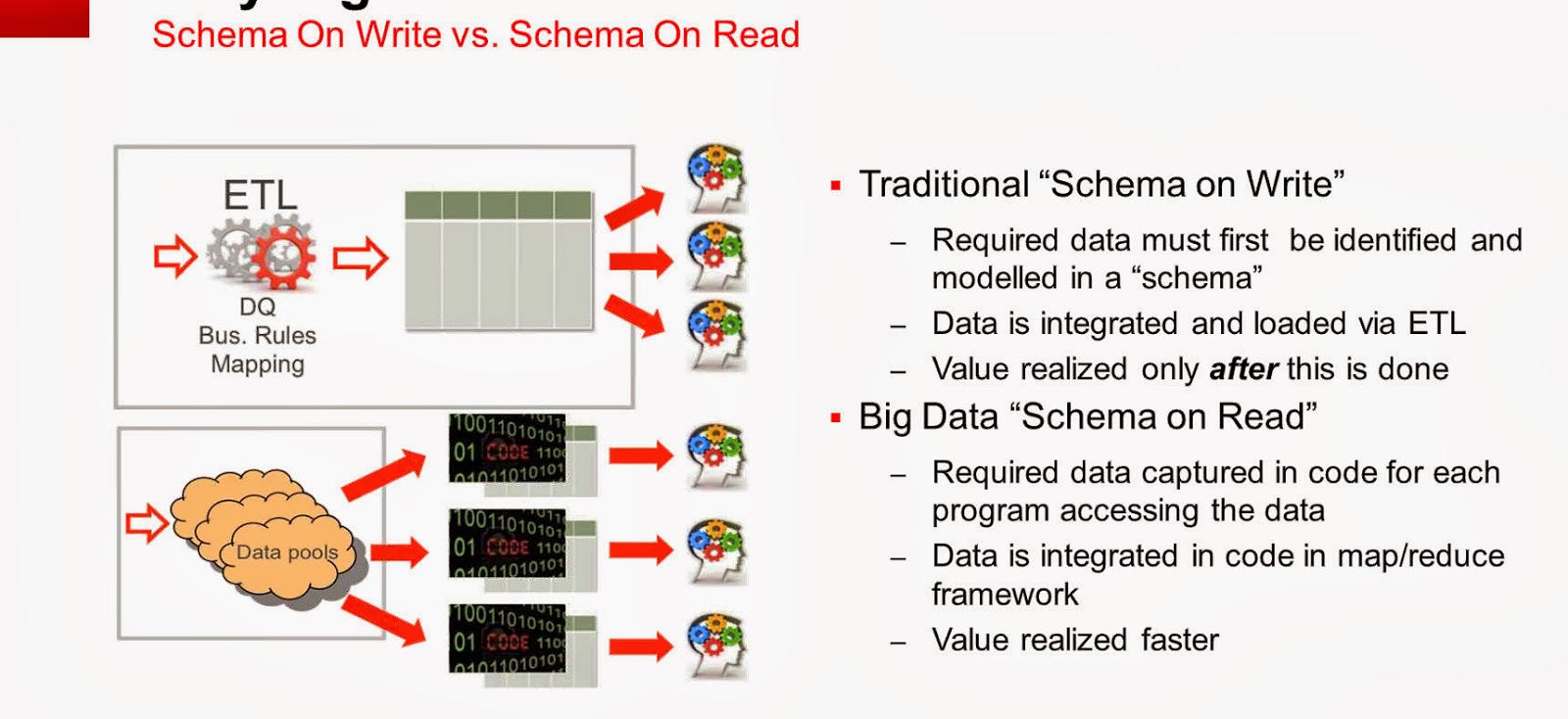
Schema on Read and Schema on Write: The differences between the two was captured from a presentation/discussion on Big data by Oracle. Regardless of SQL Server or oracle the concept described below is very important to understand.
The main focus on the difference between the 2 is that when is the value realized faster, of course there could be debates surrounding this concept.
Wednesday, February 19, 2014
Monday, February 10, 2014
Power BI - Continued...
Today Microsoft announced the availability of Power BI for Office 365. Power BI recently has been gaining a lot of traction, I attended a session with SQL PASS on 24 hours of BI where in one of the lectures was on Power BI and its components. Please use the following link for More details.
http://www.microsoft.com/en-us/powerbi/default.aspx#fbid=4fJwgwe08Zn
As per Microsoft: a cloud-based business intelligence service that gives people a powerful new way to work with data in the tools they use every day, Excel and Office 365. With Excel you can now discover, analyze, and visualize data like never before to find valuable business insights. With Power BI for Office 365 you can easily deploy a cloud-based BI environment. Couple of features that I would like to mention here:
Quickly create collaborative BI sites – enable anyone to quickly create a collaborative BI site to share workbooks containing data and insights.
Keep reports up to date with scheduled data refresh.
Please visit the the link mentioned above to know more about Power BI and it s capabilities.
In order to understand the differences between Power BI and tableau: Please read the article below written by BI Expert Jen Underwood, very detailed analysis...
http://www.jenunderwood.com/2014/01/02/understanding-the-differences-microsoft-power-bi-and-tableau/
http://www.microsoft.com/en-us/powerbi/default.aspx#fbid=4fJwgwe08Zn
As per Microsoft: a cloud-based business intelligence service that gives people a powerful new way to work with data in the tools they use every day, Excel and Office 365. With Excel you can now discover, analyze, and visualize data like never before to find valuable business insights. With Power BI for Office 365 you can easily deploy a cloud-based BI environment. Couple of features that I would like to mention here:
In order to understand the differences between Power BI and tableau: Please read the article below written by BI Expert Jen Underwood, very detailed analysis...
http://www.jenunderwood.com/2014/01/02/understanding-the-differences-microsoft-power-bi-and-tableau/
Tuesday, February 4, 2014
JOINS (Hash,Merge,Nested Loop)
As a developer one definitely would have encountered performance issues with queries run on SQL Server database. Queries that were working during the initial design phases start to slow down once projects are deployed to production. There could be several factors affecting the performance of a query, it is essential for one to understand the execution plans generated by the sql server optimizer. It is important to know what types of joins are being utilised by the optimizer and why. The joins referred to in this article are related to Hash, Merge and Nested Loop joins. The focus is on what happens behind the scenes when INNER JOIN/ OUTER JOIN queries are executed. In order to see the execution plan, one use the Include Execution Plan option in SSMS, once the query is completed, the Execution Plan is displayed in the results tab. Now lets look at what each of the joins mean.
MERGE JOIN: Match rows from two suitably sorted input tables exploiting their sort order.
HASH MATCH(Hash Join): Using Input row from the top input table to build a hash table, and each row from the bottom input table to probe into the Hash table, outputting all matching rows.
NESTED LOOP: For Each row in the top(outer) input, scan the bottom (inner) input , and output matching rows.
The following article might be dated, but it has a very relevant information with a test performed with different data set sizes and indexes: This article was written by Muthukkumaran kaliyamoorthy.
http://www.sqlserverblogforum.com/2011/10/merge-join-vs-hash-join-vs-nested-loop-join/
One can take the examples provided in the article and try to apply it to one's database and see the difference in execution plan. The difference in the joins chosen by the optimizer depends on the data size, indexes of each table involved in the join. Hope the referenced article helps developers to figure performance issues related to joins and enhance the queries better.
MERGE JOIN: Match rows from two suitably sorted input tables exploiting their sort order.
HASH MATCH(Hash Join): Using Input row from the top input table to build a hash table, and each row from the bottom input table to probe into the Hash table, outputting all matching rows.
NESTED LOOP: For Each row in the top(outer) input, scan the bottom (inner) input , and output matching rows.
The following article might be dated, but it has a very relevant information with a test performed with different data set sizes and indexes: This article was written by Muthukkumaran kaliyamoorthy.
http://www.sqlserverblogforum.com/2011/10/merge-join-vs-hash-join-vs-nested-loop-join/
One can take the examples provided in the article and try to apply it to one's database and see the difference in execution plan. The difference in the joins chosen by the optimizer depends on the data size, indexes of each table involved in the join. Hope the referenced article helps developers to figure performance issues related to joins and enhance the queries better.
Friday, January 31, 2014
BI - Spotfire,Cognos...
There has been continuous growth of vendors offering BI solutions which cover varying aspects of business intelligence. There has been a lot of emphasis on visualization, offering BI on mobile devices and making reports more interactive. One of the recent products which i got to look at were Spotfire and Cognos. Spotfire is a BI tool offering from TIBCO, Cognos is from IBM. SQL Server BI stack has been facing challenges from different vendors, Microsoft also has been growing its offerings. Coming to the 2 products Spotfire and Cognos, one of the common pitches I heard from these 2 vendors is that both of them offer zero footprint solutions, both of them are web driven tools and the user gets to access different modules available in the products. How they have pitching against the SSRS solution from Microsoft is that, with SSRS one needs to a have a client install of Visual Studio or BIDS in order to perform report development. Cognos for example has the following components with in their product like Analysis Studio (which geared more towards cube building), Query Studio and Report Studio. With respect to Spotfire i was able to get information only on Reporting and Visualization. The capabilities from Spotfire with respect to Dashboard looked impressive. Spotfire focused on how users can take advantage of Advanced analytics without requiring client side installs and providing more power to Business users.
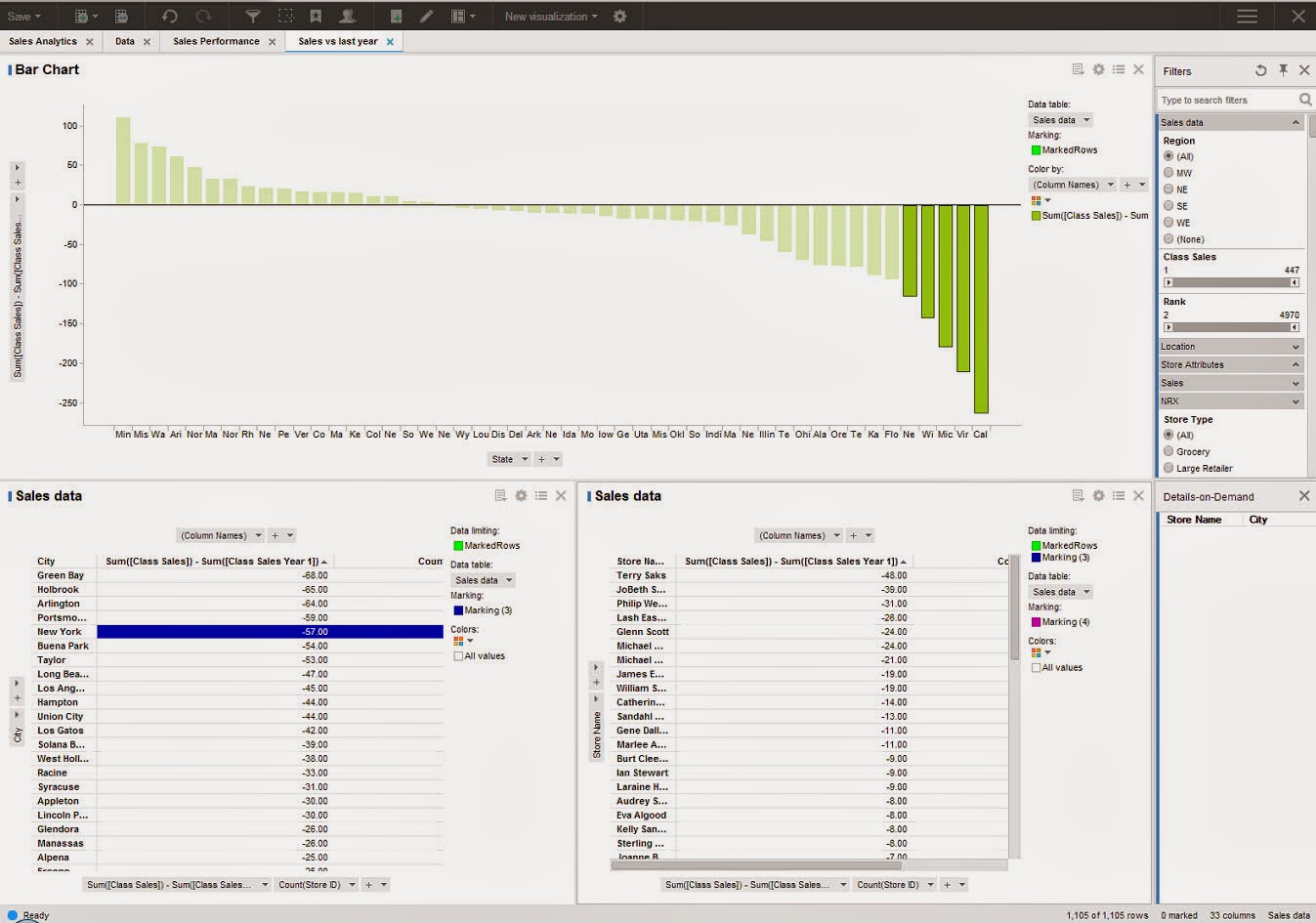
The next feature which was demonstrated was a concept called Location Analytics, this would allow users to build reports based on maps and would provide details with respect to Cities, roads and political boundaries. One of the features highlighted was the concept of Automatic Offline Geocoding, which seems like a neat concept, need to dwelve on these features more to get a understanding of the benefits.
The next feature demonstrated was the concept of Mobile Metrics and how Spotfire can support Mobile BI Reports. In order to get more details on the offerings from Spotfire, please use the following Link:
http://spotfire.tibco.com/
For details on offerings from Cognos, please visit:
http://www-01.ibm.com/software/analytics/cognos/
It would be interesting to see how the BI space pans in the coming year with emphasis on Cloud based offerings and other social network related features being added into the mix of products.
The next feature which was demonstrated was a concept called Location Analytics, this would allow users to build reports based on maps and would provide details with respect to Cities, roads and political boundaries. One of the features highlighted was the concept of Automatic Offline Geocoding, which seems like a neat concept, need to dwelve on these features more to get a understanding of the benefits.
The next feature demonstrated was the concept of Mobile Metrics and how Spotfire can support Mobile BI Reports. In order to get more details on the offerings from Spotfire, please use the following Link:
http://spotfire.tibco.com/
For details on offerings from Cognos, please visit:
http://www-01.ibm.com/software/analytics/cognos/
It would be interesting to see how the BI space pans in the coming year with emphasis on Cloud based offerings and other social network related features being added into the mix of products.
Thursday, January 23, 2014
SSMS Productivity Tips...
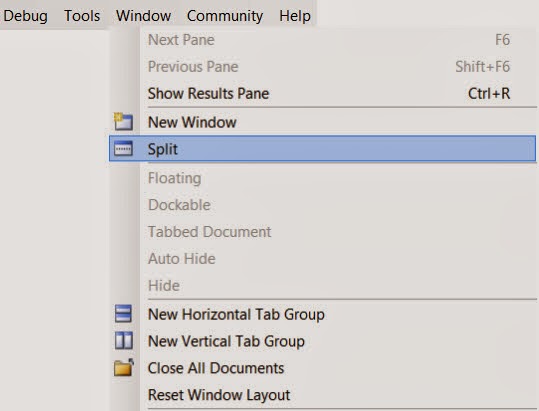
SQL Server Management Studio is the widely used tool for developers working on SQL Server development projects. There are numerous times when developers have to scroll through long pieces of code, figure out the logic, identify what variables are being used. While debugging or even while development scrolling through long pieces of code can become tedious. For example let us say I am working on a long stored procedure, i see a block of code way down where I would like to use a table variable or a temp table instead of the logic being used currently. I need to first scroll back way to the top define the temp table or table variable, then come back to the code section where the logic needs to be modified. This process could become tedious or some times we become lazy to keep scrolling up and down. There is a feature in Sql Server Management Studio where in one can split current query window. In SSMS, open the sql/script file , then in the Window Menu , Choose the Split Option. This would split the current query window into 2 Parts.
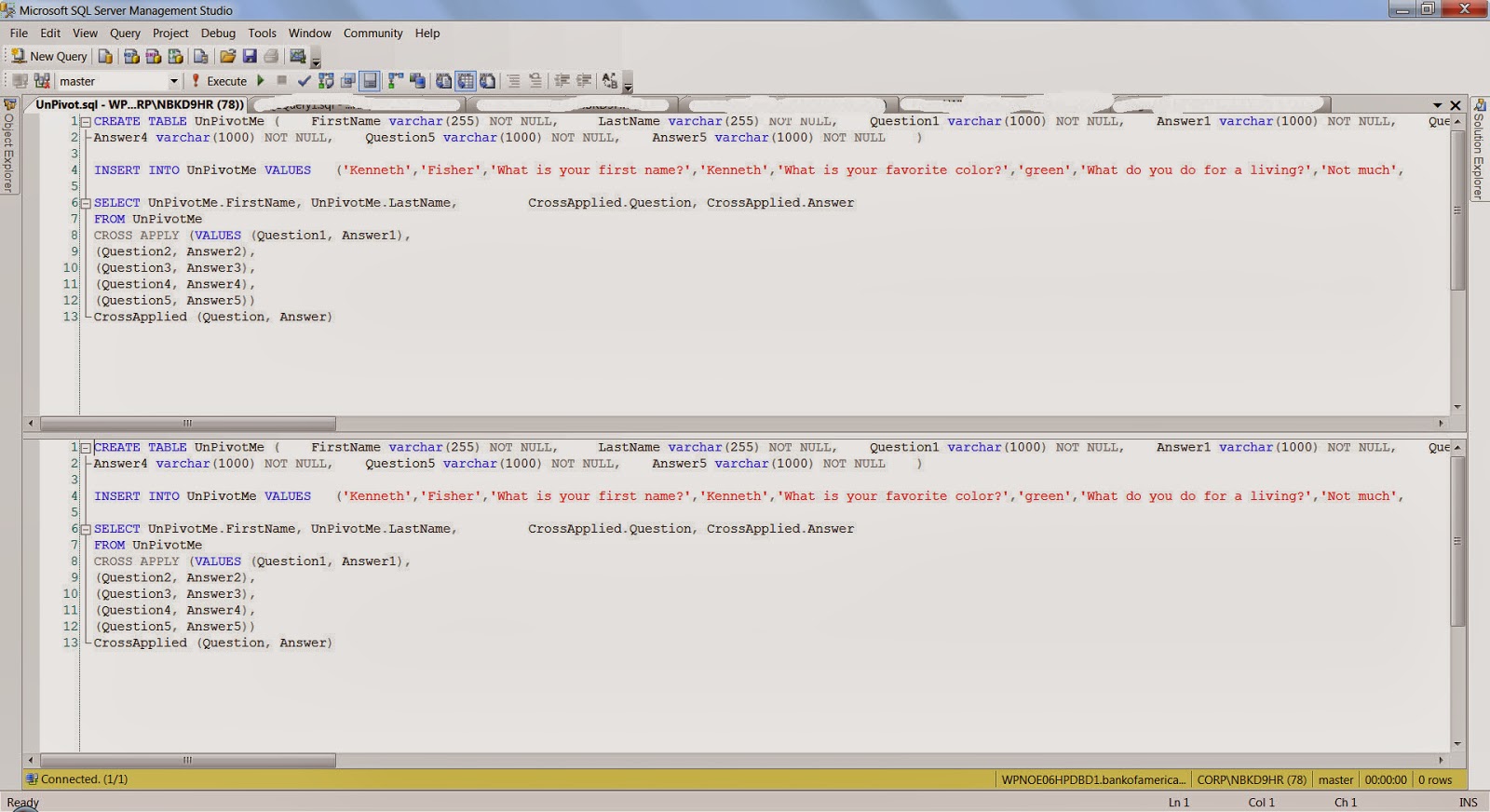
Each window can be scrolled independently. In the example I was showing let us say I was working on the Lines 1200-1220, in the bottom part I could focus on the area of the logic, In the top window I can scroll all the way to the top of the code and declare the variables and temp tables. Please see the image below.

There is also a blog post by SQL Server Expert Kendra Little on this very same topic. Here is the link for the blog post: http://www.brentozar.com/archive/2014/01/ssms-trick-edit-large-procedures-with-the-splitter-bar/.
Hope you folks find this tip useful...
Each window can be scrolled independently. In the example I was showing let us say I was working on the Lines 1200-1220, in the bottom part I could focus on the area of the logic, In the top window I can scroll all the way to the top of the code and declare the variables and temp tables. Please see the image below.

There is also a blog post by SQL Server Expert Kendra Little on this very same topic. Here is the link for the blog post: http://www.brentozar.com/archive/2014/01/ssms-trick-edit-large-procedures-with-the-splitter-bar/.
Hope you folks find this tip useful...
Friday, January 17, 2014
UNPIVOT a Table...
One of the common routines that is done while analyzing or reporting information is Pivoting and Unpivoting of data. There are lot of techniques which are employed to achieve the Pivot/Unpivot Transformation of data. I found one example where the CROSS APPLY VALUES operator is used to achieve the unpivot functionality. The implementation is pretty neat and construct is pretty easy to follow, the standard PIVOT, UNPIVOT operators provided by T-SQL sometimes are hard to follow,
Here is the high level construct: the code below is an example which has been taken from:
http://sqlstudies.com/2013/04/01/unpivot-a-table-using-cross-apply/. Please use the link to get the complete code set.
Here is the high level construct: the code below is an example which has been taken from:
http://sqlstudies.com/2013/04/01/unpivot-a-table-using-cross-apply/. Please use the link to get the complete code set.
SELECT UnPivotMe.FirstName, UnPivotMe.LastName, CrossApplied.Question, CrossApplied.AnswerFROM UnPivotMeCROSS APPLY (VALUES (Question1, Answer1), (Question2, Answer2), (Question3, Answer3), (Question4, Answer4), (Question5, Answer5)) CrossApplied (Question, Answer) One of the observation that can be made is that there is 5 columns for Question and Answer in the UnPivotMe table, which are finally transformed into rows in the final result. FirstName LastName Question Answer
Kenneth Fisher What is your first name? Kenneth
Kenneth Fisher What is your favorite color? green
Kenneth Fisher What do you do for a living? Not much
Kenneth Fisher What is 2x3 6
Kenneth Fisher Why? Because
Bob Smith What is your first name? Robert
Bob Smith What is your favorite color? blue
Bob Smith What is 4x7? 28
Bob Smith What is 7x6 Life the Universe and Everything
Bob Smith Why? Why notMonday, January 6, 2014
ColumnStore Indexes...
With the increasing amounts of data, there is lot of expectations from data warehousing solutions in terms of performance and accuracy. There is a constant demand for increased performance of queries from a data warehouse. With huge amount of rows sometimes performance of queries get affected due to the time spent in pre-aggregating or aggregating data. With this backdrop there has been the emergence of columnstore indexes. What is a columstore index in SQL Server? Quoting from Microsoft Technet: Columnstore indexes in the SQL Server Database Engine can be used to significantly speed-up the processing time of common data warehousing queries. Typical data warehousing workloads involve summarizing large amounts of data. The techniques typically used in data warehousing and decision support systems to improve performance are pre-computed summary tables, indexed views, OLAP cubes, and so on. Based on this definition what is the advantage over traditional row based storage. In Databases with ColumnStore indexes SQL Server stores data in a columnar format based on the column with columnstore Index. Since data is stored one column At a time, this allow sql server to perform aggregations on the single column very quickly instead of traversing through each row. Also Since only the columns needed must be read this greatly reduces the Disk I/O activity. Most queries do not encompass all columns in a table which means that lesser data would be bought into memory thereby enhancing the speed of the queries.
Some important points to keep in mind with respect to ColumnStore index
Clustered index key – If a base table is a clustered index, all columns in the clustering key must be present in the nonclustered columnstore index. If a column in the clustering key is not listed in the create index statement, it will be added to the columnstore index automatically.
Partitioning – Columnstore indexes works with table partitioning. No change to the table partitioning syntax is required. A columnstore index on a partitioned table must be partition-aligned with the base table. Therefore a nonclustered columnstore index can only be created on a partitioned table if the partitioning column is one of the columns in the columnstore index.
In SQL Server 2012 Columnstore indexes are not updatetable, i guess in SQL Server 2014 there are plans to make them updatetable.
Some important points to keep in mind with respect to ColumnStore index
Clustered index key – If a base table is a clustered index, all columns in the clustering key must be present in the nonclustered columnstore index. If a column in the clustering key is not listed in the create index statement, it will be added to the columnstore index automatically.
Partitioning – Columnstore indexes works with table partitioning. No change to the table partitioning syntax is required. A columnstore index on a partitioned table must be partition-aligned with the base table. Therefore a nonclustered columnstore index can only be created on a partitioned table if the partitioning column is one of the columns in the columnstore index.
In SQL Server 2012 Columnstore indexes are not updatetable, i guess in SQL Server 2014 there are plans to make them updatetable.
Subscribe to:
Posts (Atom)