With the advent of newer technologies and tools ins area of Data Analytics, Data Science, Big Data and Data Visualizations, the Pass Business Analytics 2016 conference to held in San Jose from May 3-4 provides lot of interesting sessions and topics of discussion. Please do check out the web site below for further details:
http://passbaconference.com/2016/Home.aspx
It is a tremendous opportunity to grow your network and skill base, with lot of talented speakers/experts presenting on very interesting topics. There has been a lot of momentum in the Microsoft BI space especially with PowerBI and its related set of tools. There are very useful sessions with Power BI and Power Pivot provided by folks from the company:
http://www.powerpivotpro.com/. They provide a lot of training in Power BI and PowerPivot, also provide consulting on projects that would need PowerBI and PowerPivot.
When you get a chance, check them out...
Showing posts with label PowerPivot. Show all posts
Showing posts with label PowerPivot. Show all posts
Thursday, April 21, 2016


Thursday, September 26, 2013
PowerPivot,PowerViewer and Excel 2013...
I finally got to install the office 2013 suite and the first thing i was curious to check out was tie in to the Powerpivot and Powerviewer tools. These 2 were integrated with Excel 2013, there has been a lot of discussion about this especially the Powerviewer piece and whether it needs to be tightly integrated with Excel. In Excel 2013, under the File /Options menu, there is a section for Add-on. In the list of Add-on, one will be able to see the add-on for Powerpivot and Powerview. Click on the check box right beside the add-ons. In the bottom portion of the screen, there is a drop down to manage add-ons, one would need to choose COM Add-on and then click ok at the bottom of the screen.

The next screen is where one can make the Add-ons Active, click the check box next to add-ons and click Ok. Once this is complete, one should be able to see the PowerPivot option on the Menu. Click on the PowerPivot Option, there will be a Manage option on the main bar. Once you click the Manage option, there will be a new window which will be presented to manage the database connection and do the data analysis.

![]()


The next screen is where one can make the Add-ons Active, click the check box next to add-ons and click Ok. Once this is complete, one should be able to see the PowerPivot option on the Menu. Click on the PowerPivot Option, there will be a Manage option on the main bar. Once you click the Manage option, there will be a new window which will be presented to manage the database connection and do the data analysis.


Monday, December 31, 2012
PowerPivot-SQL Server Data Import...
I would like to take this opportunity to wish all of my blog readers/visitors a very happy new and prosperous new year 2013. In the coming year I am sure there would be a lot of paradigm shifts/new methodologies/big data analytics adoption. I hope it is a good prosperous year for all of us. In this blog post I would like to write about PowerPivot, more importantly how to import data from SQL Server. The PowerPivot Download is available in the following website:
http://www.microsoft.com/en-us/bi/powerpivot.aspx. In the link mentioned there are also of lot of demonstration videos regarding the use of PowerPivot.
In order to install PowerPivot, one needs to have the Excel 2010 Add On, in case one has Excel 2010 as part of Office 2010 that should be sufficient as well. Once PowerPivot is installed and one opens Excel 2010, there is a PowerPivot Option at the end. When PowerPivot Option is choosen, this needs to be done in order to work with PowerPivot, one can see the screen captured below.
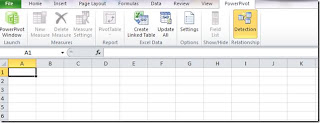
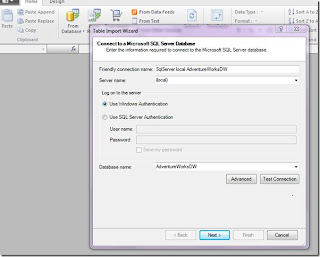
Once the above screen appears, the user needs to click on the PowerPivot Window icon, this will bring up the next screen. In that screen, in the From Database option choose From SQL Server. This will allow one to connect to SQL Server database and choose the tables that needs to be used for PowerPivot reports.
Customer stories:
http://www.microsoft.com/en-us/bi/CustomerStories.aspx
http://www.microsoft.com/en-us/bi/powerpivot.aspx. In the link mentioned there are also of lot of demonstration videos regarding the use of PowerPivot.
In order to install PowerPivot, one needs to have the Excel 2010 Add On, in case one has Excel 2010 as part of Office 2010 that should be sufficient as well. Once PowerPivot is installed and one opens Excel 2010, there is a PowerPivot Option at the end. When PowerPivot Option is choosen, this needs to be done in order to work with PowerPivot, one can see the screen captured below.


Customer stories:
http://www.microsoft.com/en-us/bi/CustomerStories.aspx
Tuesday, December 8, 2009
PowerPivot
While i was reading Pinal Dave's summary on PowerPivot in his blog(blog.sqlauthority.com), It made me curious and wanted to check out what the product is and what would be the features. Microsoft has put a out a nice website with the download option along with videos and try out Powerpivot hands on in the virtual lab. Here is the web site:
http://www.powerpivot.com/
I decided to check out the virtual lab of powerpivot. It was a nice tutorial lab experience to begin with. The lab takes you through how to launch the powerpivot window and connect to a sql server database. Then there is a series of steps in the lab manual which appears on the side. This instructs the user as to how to go about creating a Pivot table report along with a chart. Once i went through these steps it became evident that it is going to give the Power Users/Analysts of an organisation a self service BI component. The users can use Powerpivot to build out very useful Pivot tables/charts, it also gives the ability the user to refresh the reports/charts real time. The one thing i noticed as i was going through Powerpivot was that the interface could take some time to get used to along with plethora of other options. I guess main deal with the user interface is the office 2010 layout along with the placement of options. The lab also takes the user through on how to create a powerpivot report using data from the web. I guess with this way of extracting data from the web, it leads the way to accessing unstructured data present on the web. In the final analysis based on the initial looks Powerpivot is a powerful tool for doing BI for power users. It will be interesting to see how Powerpivot coexists with sql server analysis services in terms of how the lines will be drawn between the two tools in terms of usage.
http://www.powerpivot.com/
I decided to check out the virtual lab of powerpivot. It was a nice tutorial lab experience to begin with. The lab takes you through how to launch the powerpivot window and connect to a sql server database. Then there is a series of steps in the lab manual which appears on the side. This instructs the user as to how to go about creating a Pivot table report along with a chart. Once i went through these steps it became evident that it is going to give the Power Users/Analysts of an organisation a self service BI component. The users can use Powerpivot to build out very useful Pivot tables/charts, it also gives the ability the user to refresh the reports/charts real time. The one thing i noticed as i was going through Powerpivot was that the interface could take some time to get used to along with plethora of other options. I guess main deal with the user interface is the office 2010 layout along with the placement of options. The lab also takes the user through on how to create a powerpivot report using data from the web. I guess with this way of extracting data from the web, it leads the way to accessing unstructured data present on the web. In the final analysis based on the initial looks Powerpivot is a powerful tool for doing BI for power users. It will be interesting to see how Powerpivot coexists with sql server analysis services in terms of how the lines will be drawn between the two tools in terms of usage.
Subscribe to:
Posts (Atom)