With increasing amounts of data and information, one of the challenges business face is how to access the data and how the data needs to be stored. One of the concepts that can be used to effective and efficient provisioning of data is the use of Data Services. One of the requirements to having a good data service is to make sure the underlying data is clean and properly modeled. There is a lot of effort that needs to going to making sure the data is properly cleansed and correctly modeled in the data store/data marts. Once this is accomplished, using data services provides advantages to the consuming application. The concept of data service brings in the notion that the Data quality is done in a central place which includes cleansing and enriching data. The advantages of Data services include 1)Agility - This allows customer to access data quickly and also doesn't place the burden of having knowledge of the underlying data. 2)Cost Effectiveness - Data analyst/providers can build the foundation of quality/modeled data and the presentation layer can be determined by the consumers.
Different applications/consumers could use the standard web services and access the underlying data.
3) Data Quality - Data Access is controlled data services, which in turn allows data quality to improve at the central location. 4)Consistency - Using data services could drive consistency in accessing data from the data store and eliminate different data provisioning approaches.
There are vendors who provide data service tools, they can be categorized into
1. Volume Based Approach
2. Data Type Based Approach.
Hope this blog post provides an insight into Data Services.
Showing posts with label Microsoft Azure. Show all posts
Showing posts with label Microsoft Azure. Show all posts
Wednesday, April 13, 2016


Friday, April 1, 2016
Data Gravity...
With the advent of Big data, cloud technologies , data science there has been lot of interests in moving towards cloud based solutions for Business Intelligence and other applications. More companies/business are looking towards cloud deployments or showing interest in cloud based solutions. While all this has been going on, there also has been a tremendous growth in volume of data and information being shared and requested. The data volume has also bought into perspective the notion of whether data needs to be present on-premise or should data be moved to the cloud. While researching the ideas being suggested around data volumes, i came across the concept of data gravity. Jen Underwood , Data Analytics and BI expert, has written an excellent article covering the concept of data gravity. Please see the link below for the full article.
http://www.jenunderwood.com/2016/02/27/hybridbi/
She covers the concept of data gravity, the type of solutions available and also some of the vendors who offer solutions. The concept of on-premise vs cloud based BI/Data storage provides interesting insights and would be very useful for folks who are planning their data storage and provisioning strategy. The concept of stretch databases are also covered in the article above. An interesting read on data gravity and types of solutions being offered.
http://www.jenunderwood.com/2016/02/27/hybridbi/
She covers the concept of data gravity, the type of solutions available and also some of the vendors who offer solutions. The concept of on-premise vs cloud based BI/Data storage provides interesting insights and would be very useful for folks who are planning their data storage and provisioning strategy. The concept of stretch databases are also covered in the article above. An interesting read on data gravity and types of solutions being offered.
Saturday, March 19, 2016
Experiments - Azure ML Studio
Azure ML studio is very intuitive and a powerful tool that can be used for performing different type of data analysis experiments. The Studio can be used to set up very basic experiments like descriptive statistics to performing complicated machine learning algorithms. The whole layout of the ML studio is very user friendly and in some ways remind me of the layouts in SSIS packages. I decided to setup a basic experiment in ML studio to perform certain descriptive statistics calculations on a sample data set. The dataset I used was adult census data from UCI repository and ran the data set through a R script component to data, once the data was massaged it was run through a descriptive statistics to perform descriptive statistics on each column. Once all the components are in place the experiment can be run in the ML studio to get the results. The data can be verified and if everything looks good, the experiment can be published as a web service and can be accessed by a say .NET program.
I have illustrated the experiment which i have set up in the ML Studio.

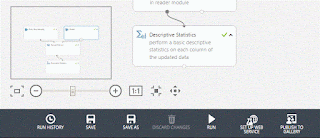
I have illustrated the experiment which i have set up in the ML Studio.


Hope this provides a basic overview of ML Studio. Azure ML studio opens up a lot of possibilities to perform different types of data science experiments and bring them more into the main stream.
Friday, August 7, 2015
Azure ML Studio - Part 1
Data Science has been experiencing tremendous growth in the business world today, there is a tremendous scope/job opportunities for people with Data Science Experience. One of the challenges has been to learn the different components of Data Science since most of them involve lot of Statistical, Math, Data Mining Algorithms knowledge. Microsoft on its part has been working steadily expose data science for the programming public. Initially Azure was slow to take off, but now with growing cloud implementations, Azure has been experiencing a lot of growth. So Microsoft decided to use the Azure platform and provide Data Science tools for the programmers. One of the very effective tools that is offered is called the Azure ML Studio, this is a development environment for Machine Learning Model Development. The interface of this tool is similar to some of the Visual Studio tools provided earlier by Microsoft. In order to start using a the Azure ML Studio one needs to have a Azure account. The whole concept of Azure ML works on the concept of Software as a service. One can use the following link to learn more about the Azure ML capabilities:
https://studio.azureml.net/
Once you login to the azure studio, the first that will happen is that the workspace will be set up. There will be a + symbol at the bottom of the workspace, click on that to create your first experiment. You have a couple of choices here 1) You can create a blank experiment 2) You Can create a experiment based on the templates provided. The option 2 would help one to set up an experiment quickly and understand the various components of the experiment. When you choose from the samples, you can either open it in ML Studio and view it in the gallery. I feel tools like Azure ML studio provide a great first step in exploring the power of Machine Learning/Data Science.
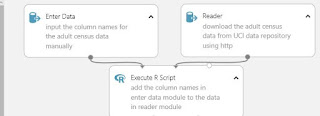
 In the image above the column_name is the header in the csv file and the other below it are actual column names which would be used to assign it to the data set ready by reader component.

One of the components in the above image is the Enter Data component. This component is primarily used for defining column headings, these column headings can be used to assign to the data sets that are read through the Reader component. In this case in the Reader component, we are downloading a file from a website. Since in this example the headers of the file downloaded by Reader component were not user friendly, we use the Enter Data component to provide meaningful column_names. In this example we have used the column_names to be in the csv format. For example please see the image below for Enter Data component:
Monday, October 6, 2014
Hive, BI Best Practices, Machine Learning...
The SQL Saturday BI edition that
was held in Charlotte on October 4, 2014 had some interesting topics which I
attended. They were really insightful and provided me with some good
information that I would like to share. The first session by was given by Kevin Goode on topic of Introduction to Hive,
the session was really interesting with lots of questions and Answers. HIVE
basically is a layer on top of hadoop that allows users to write SQL language
type queries. HIVE in turn take the SQL queries and converts them to map reduce
jobs, they get executed the hadoop layer. The results are then provided back to
the user. HIVE uses a language called HQL which is a sqlvariant and has lots of
similarities like MySQL and Oracle Syntax. The query construct of HQL has
commands which very similar to Transact SQL. One of the main things that need
to keep in my mind is that HQL/HIVE does not great optimizer like sql server,
so while constructing the join statements in HQL one has to be very careful
about placing the tables in the join. HIVE?HQL is best suited for anaylytical queries and also it has no updates and deletes. The rule of thumb for now seems to be
that the smaller tables come first and then the larger tables. HQL/HIVE also
provided some type of execution plan but these are not as sophisticated as the
ones you see in SQL Server. The error messages provided by HQL when there
are issues are more java based, so it could a little bit of getting used while
working with HQL error messages. While working with HIVE/HQL the developer
should be aware of the type of data coming in and how it is partitioned. The
organization of data really helps optimizing the HQL queries. The results
provided by HQL can be used to feed a traditional datawrehouse system.One of
the areas where Hadoop is weak is in the area of security. Security is not very
structured in hadoop, the security has to be achieved using other bolt on
tools. Hortenworks is one of the leading distributors of hadoop and they
provide information regarding HQL. The frontend provided to connect to HIVE is
completely web based and users can use this tool to write HIVE queries using
HQL. Hortenworks is one of the big players in hadoop distributions: please
visit the hortenworks website here.
The
second session which attended was on tabular models. The topic was about how
build a tabular model using visual studio 2012 with SSAS 2012 tabular instance
installed. It was an informative topic as it bought out the differences between
SSAS traditional MDX based and tabular solutions. One of the key differentiators
is that SSAS is disk based and tabular is in memory and provide good speeds.
The limitation of the tabular model would be size of memory that can be used to
hold tabular models. Also with tabular you don't have writeback capabilities. The demo was pretty impressive, some of the steps done in
the demo very similar to how one would go about building SSAS cubes. The
topic was presented by Bill
Anton and his blog is located
at:
The third
session which attended was the most crowded of all the sessions. It was about
Best Practices for delivering BI solutions. The audience were all BI
professionals and also were with IT in various companies. SQL Server BI Expert James Serra provided a great session on best
practices. He started off with why BI projects fail, a Gartner study has
revealed that around 70% of BI projects fail. The fail factors ranges from lack
of expertise/experience, lack of proper communication, requirements and project
management. He highlighted the issues of clash between Business and IT over how
the solution should be delivered. One of the interesting aspects that was
mentioned was for technology to provide a clean data ware house and then build
some abstraction layers on top of the warehouse, once that is done allow the users
to build the users to utilize self-service BI solutions.Understand the difference between kimball and Inmon priciples, cappabilities of tabular vs Multidimensional, star schema vs relational. Please visit his
website for some great information on this topic and other aspects related to
Datawarehouse.
The final
session I attended was about Introduction to Microsoft Azure
Machine Learning, this topic was really exciting and informative. The
topic is basically about predictive analytics, the tools
provided by Microsoft as part of the Azure framework. Microsoft has a
group called Microsoft research which initially working on developing
algorithms for the Data mining product as part of SSAS. In the past few years
there has not been much push on data mining within SSAS. Recently
with Microsoft making a big push for cloud services offerings as part
of the Azure framework, all the Microsoft research are now being made
part of Machine learning using Microsoft Azure. He is a link that provided
a head start on the Machine learning topic: http://azure.microsoft.com/en-us/documentation/services/machine-learning/.
During the Session Bill
Carroll provided an
insightful demo of the machine learning framework within Microsoft Azure.
Azure provides a very nice framework for a developer to set up an
experiment. The workspace for setting up experiments look very similar to SSIS
workspace within visual studio. As part of the setting up experiment, one feeds
data to an algorithm based on the type of outcome that is needed, then the
model is trained, scored and evaluated, the model can be published. Once the
model is published, it can be called through an application using a web
service. There are code snippets available in C#, Python to call the web
service to execute the model. Some of the examples of machine learning are when
a user purchases a product in amazon, there are a list of recommended products
that are generated, list of recommended movies in Netflix based on
users watching preference, and these are some of real life examples, where
Machine learning is used.
Subscribe to:
Posts (Atom)