Showing posts with label SQL Server 2016. Show all posts
Showing posts with label SQL Server 2016. Show all posts
Friday, September 16, 2016
Data Virtualization-Data Conditioning/Masking
These days business are expected to agile and have to deliver solutions quickly and efficiently. This means that while developing products it has to be moved through the different environments efficiently and quickly. There is also a lot of dependency on data in the test and lower level environments. The quality of data in the test environments need to good so that the applications using the data can be tested effectively. Often organizations run into challenges while populating data in Lower level environments either due to space issues and just the time taken to condition data takes a very long time, this thereby affects product delivery. This where products that specialize data virtualization come in. Delphix is one such product which enables organizations to effectively get production type data in test environments. Here is the website for the product:https://www.delphix.com/. According to the website: "Speed wins. It’s a simple fact. The faster you can deliver new applications, features and upgrades to market, the better your business performs. For that you need faster data. And for faster data, you need Delphix.". Please refer to the link below which explains the need for having such a product. https://www.delphix.com/why-delphix. As the nature of application development keeps changing, the quality of data needed for testing and other pre-production activities becomes very important and essential.


Tuesday, August 2, 2016
Data Science - Education
With the rapid growth of Big data technologies , there has been an exponential growth of data science and its related technologies. This has has also led to the demand for data scientists and also the jobs related to data science are very lucrative. Microsoft has been steadily expanding it s cloud based offerings and also getting into big Data related technologies and efforts. Since there is tremendous need for Data science skills, Microsoft has come forward to offer a curriculum totally devoted to Data Science. This curriculum is offered via edx.org. There are a total of 9 courses and the price per course ranges from $49-$99. There is also a final project for which around 6-10 hours is required. One can check the link below for all the details:
https://www.edx.org/microsoft-data-science-curriculum
The courses cover from Use Microsoft Excel to explore data to Iimplement a machine learning solution for a given data problem. Each of the course can be done a auditing course or one can upgrade to get a validity certificate on passing the course. Each of the courses have Labs ,Quizzes and discussion forums, the discussion forums can be use to get questions answered related to the concepts being discussed. I hope the courses provide the much needed insights into Data Science.
https://www.edx.org/microsoft-data-science-curriculum
The courses cover from Use Microsoft Excel to explore data to Iimplement a machine learning solution for a given data problem. Each of the course can be done a auditing course or one can upgrade to get a validity certificate on passing the course. Each of the courses have Labs ,Quizzes and discussion forums, the discussion forums can be use to get questions answered related to the concepts being discussed. I hope the courses provide the much needed insights into Data Science.
Monday, April 4, 2016
SQL Server 2016 - Query Store
Performance tuning is a constant topic of discussion, also one of the top priority items when it comes to good code development, better performing queries provide quicker response times, users/customers are satisfied. There have been constant improvements in the area of performance tuning features in SQL Server, also in the later releases of SQL Server, the execution plans were greatly improved. It is very important for developers to understand execution plans so that they improve queries that cause bottlenecks in the application. One of challenges have been to effectively store execution plans and queries so that they could be reviewed for bottlenecks and improve them. In SQL Server 2016 the concept of query store has been introduced. This Query store feature helps one to gain insight into the query plans and statistics.
In order to enable query store feature in SQL Server 2016, one can use Transact-SQL:
ALTER DATABASE AdventureWorks2012 SET QUERY_STORE = ON;
The query store feature in SQL Server 2016 can also be enabled through SQL Server Management Studio, by choosing the database properties/query store page.
Quoting from Microsoft MSDN Page: I am listing a couple of scenarios for using query store feature:
In order to enable query store feature in SQL Server 2016, one can use Transact-SQL:
ALTER DATABASE AdventureWorks2012 SET QUERY_STORE = ON;
The query store feature in SQL Server 2016 can also be enabled through SQL Server Management Studio, by choosing the database properties/query store page.
Quoting from Microsoft MSDN Page: I am listing a couple of scenarios for using query store feature:
- Quickly find and fix a plan performance regression by forcing the previous query plan. Fix queries that have recently regressed in performance due to execution plan changes.
- Determine the number of times a query was executed in a given time window, assisting a DBA in troubleshooting performance resource problems.
The MSDN link for Query Store is listed below: The page below provides a more completion explanation of query store.
Friday, January 15, 2016
SSRS 2016-New Features...
With a plethora of reporting, data visualization tools ,SSRS was getting buried in the mix. The question was would SSRS 2016 get any major updates or would that kind of go away slowly with other tools taking prominence. The good news is that SSRS 2016 is getting lot of new features, here are some of them: Reporting Services Web Portal: The usual SSRS portal has undergone a major revamp and the portal looks more in tune with the current dash board offerings from other vendors. One of the major change has been the use of HTML 5 in SSRS 2016 which should allow reports to be portable across devices and increase the offering s more effectively. There is also a feature being added called Mobile report Publisher where in you can publish SQL Server mobile reports to your reporting portal. For more detailed explanation of SSRS 2016 features, please refer to the link here below:
https://msdn.microsoft.com/en-us/library/ms170438.aspx
https://msdn.microsoft.com/en-us/library/ms170438.aspx
Thursday, December 31, 2015
Big Data Trends in 2016...
First, I would like to wish the readers of my blog a very happy and prosperous new year 2016. Due to personal challenges i could not post much in 2015, i hope i can do better in 2016. Looking forward to how the year 2016 shapes up for analytics, if there are newer trends or consolidation of big and small technology firms in the analytics space. There were lot of strides made in data science, the programming language R has become increasingly popular across various industry domains, More business folks are beginning to understand the power of good models and how it can be pursued for predictive analytics. There were also strides made in bringing R and SQL Server together, this will be seen more in 2016 as we begin to see more valid business used cases.
Here is a link for the Top Big 3 data trends in 2016.
http://insidebigdata.com/2015/12/29/the-top-3-big-data-trends-of-2016/
Once again wishing everyone a very happy 2016.
Here is a link for the Top Big 3 data trends in 2016.
http://insidebigdata.com/2015/12/29/the-top-3-big-data-trends-of-2016/
Once again wishing everyone a very happy 2016.
Sunday, September 27, 2015
SSRS - What is new in SQL Server 2016...
SQL Server 2016 is around the corner, there are lot of improvements/new features that are being deployed as part of SQL Server 2016. One of the areas where there have been improvements made is SSRS, this reporting tool has been overshadowed by Self service BI tools such as Power BI and other reporting tools. I would like to present the blog article from Matt Landis where he discusses about SSRS in SQL Server 2016.
http://windowspbx.blogspot.com/2015/05/sql-server-2016-reporting-services-ssrs.html
Some highlights from SSRS in SQL Server 2016:
http://windowspbx.blogspot.com/2015/05/sql-server-2016-reporting-services-ssrs.html
Some highlights from SSRS in SQL Server 2016:
- Now supports all major browser: Internet Explorer, Chrome, Firefox, and Safari
- Power BI Integration
- Report templates and themes similar to Power BI
- Customize Report Themes using CSS
- Improved report parameter UI
- Now supports mobile BI and data visualization on Windows, iOS, and Android devices
Wednesday, July 29, 2015
SQL Server 2016 and R-Integration...Part 2
In this blog post I would like to continue the discussion which done in the Part 1 of the SQL Server 2016 and R-Integration. In this blog post I would like to discuss one of the important R Libraries that can speed up the learning process a little and get to analyzing the data more quickly. The library I would like to discuss here is called Rattle. The library rattle can be installed in R by using the following commands. The commands below can be executed within R-Studio. The R-Studio is a more UI friendly to work on R-Commands and scripts.
install.packages("rattle")
rattle()
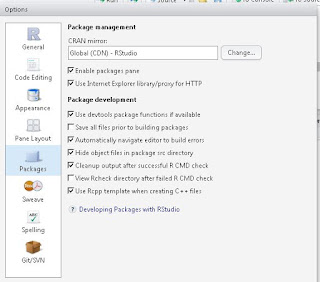
The install.packages() command in R will install all the files within the rattle library. In R-Studio one would set up the path to pull down the libraries as needed. As you can see the option for Use Internet Explorer Library/Proxy for HTTP is enabled.
Once the package is installed, you can execute the rattle() function with the R-Studio, this will launch a GUI for rattle which has lot of useful options for doing data analysis. In the Rattle GUI as you can see there are lot of options that can be used for source of data, in the example below I am choosing the R-Dataset called who for analysis. Make sure to hit the execute option once you have chosen the data source from the drop down list.
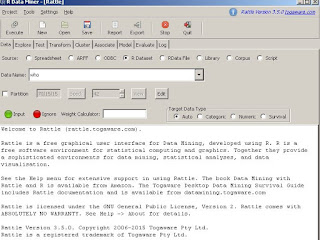
In order to explore the dataset , use the explore tab and choose the summary option and I additionally choose Basics. These 2 options combined provides an quick overview of the dataset who by providing some important statistical data about the data set.

There are a lot more options available in rattle to do much more complex data analysis. As the integration between SQL Server and R continues, I am hoping such utilities are provided by Microsoft so that the data analysis can be more enhanced
install.packages("rattle")
rattle()
The install.packages() command in R will install all the files within the rattle library. In R-Studio one would set up the path to pull down the libraries as needed. As you can see the option for Use Internet Explorer Library/Proxy for HTTP is enabled.

Once the package is installed, you can execute the rattle() function with the R-Studio, this will launch a GUI for rattle which has lot of useful options for doing data analysis. In the Rattle GUI as you can see there are lot of options that can be used for source of data, in the example below I am choosing the R-Dataset called who for analysis. Make sure to hit the execute option once you have chosen the data source from the drop down list.

In order to explore the dataset , use the explore tab and choose the summary option and I additionally choose Basics. These 2 options combined provides an quick overview of the dataset who by providing some important statistical data about the data set.

There are a lot more options available in rattle to do much more complex data analysis. As the integration between SQL Server and R continues, I am hoping such utilities are provided by Microsoft so that the data analysis can be more enhanced
Saturday, July 18, 2015
SQL Server 2016 and R-Integration...Part 1
Earlier I had blogged about SQL Server and R can be connected to perform data analysis. Also in SQL Server 2016 there is supposed to be better R Integration. In today's market Data scientists/Data Wranglers are in great demand since organizations have piles of data and want to make sense of the data, also if data can provide valuable insights. Given these market trends and the push for aligning the business and data more closely it is important to have the analytic skills. In this blog I would like to provide an article which gives a flavor of sql server 2016 and R-Integration. In the link below:
http://blog.revolutionanalytics.com/2015/05/r-in-sql-server.html. The article describes SQL Server program managers Lindsey Allen and Borko Novakovic demonstrated a prototype of running R within SQL Server. For the R-Integration,Microsoft SQL Server has collaborated with http://www.revolutionanalytics.com/products. I hope you find the article and demo provided in the link above useful.
http://blog.revolutionanalytics.com/2015/05/r-in-sql-server.html. The article describes SQL Server program managers Lindsey Allen and Borko Novakovic demonstrated a prototype of running R within SQL Server. For the R-Integration,Microsoft SQL Server has collaborated with http://www.revolutionanalytics.com/products. I hope you find the article and demo provided in the link above useful.
Subscribe to:
Posts (Atom)