Monday, December 31, 2012

PowerPivot-SQL Server Data Import...

I would like to take this opportunity to wish all of my blog readers/visitors a very happy new and prosperous new year 2013. In the coming year I am sure there would be a lot of paradigm shifts/new methodologies/big data analytics adoption. I hope it is a good prosperous year for all of us. In this blog post I would like to write about PowerPivot, more importantly how to import data from SQL Server. The PowerPivot Download is available in the following website:
http://www.microsoft.com/en-us/bi/powerpivot.aspx. In the link mentioned there are also of lot of demonstration videos regarding the use of PowerPivot.
In order to install PowerPivot, one needs to have the Excel 2010 Add On, in case one has Excel 2010 as part of Office 2010 that should be sufficient as well. Once PowerPivot is installed and one opens Excel 2010, there is a PowerPivot Option at the end. When PowerPivot Option is choosen, this needs to be done in order to work with PowerPivot, one can see the screen captured below.


Once the above screen appears, the user needs to click on the PowerPivot Window icon, this will bring up the next screen. In that screen, in the From Database option choose From SQL Server. This will allow one to connect to SQL Server database and choose the tables that needs to be used for PowerPivot reports.


Customer stories:
http://www.microsoft.com/en-us/bi/CustomerStories.aspx

Wednesday, December 12, 2012

In Memory Analytics...

In the past couple of years there has been a lot of growth in the different type of Analytics that is being performed at various organizations. There has been a tremendous requirement for companies to be very Agile and have a speed to market to introduce their products and services. This has resulted in lot of exciting requirements for the BI Analytics domain to fullfill. In the SQL Server space, Microsoft first introduced inMemory analytics through PowerPivot. Now with SQL Server 2012 we have a new type of Analytics called the Tabular Model which uses InMemory Analytic capabilties. This is different from the SSAS model of analytics. These days the end users/Business users have been provided with tools to harness the power of inMemory Analytics. The couple of in Memory technologies available in SQL Server 2012 are  xVelocity Analytics, xVelocity Column Store and Power Pivot. Quoting the Microsoft web site(www.microsoft.com),xVelocity is a family of memory-optimized technologies spanning Analytical, Transactional, Streaming and Caching data. Designed for industry standard hardware, xVelocity is a built-in capability in SQL Server 2012, SQL Server Parallel Data Warehouse, Office Excel 2013 and Windows Azure. Please read the following the blog post in the link provided below about a very fast inMemory analytics project from Microsoft, this is still in Private customer Preview.
http://blogs.technet.com/b/dataplatforminsider/archive/2012/12/11/how-fast-is-project-codenamed-hekaton-it-s-wicked-fast.aspx


Tuesday, December 4, 2012

Data Abstraction-Data Integration

In my earlier blog post I discussed about data integration and how it can provide unified view of disparate data sources. In today's world of data warehousing/data analytics it is becoming increasingly common to have disparate data sources and there are lots of ETL projects which are aimed at consolidating the data into data marts and data warehouses. In today's blog post I would like to introduce a new product called Composite Software which helps in Data Integration and Provides Data Abstraction. It helps the business to perform Data Virtualization. This provides the business with following benefits:

•Simplify information access – Bridge business and IT terminology and technology so both can succeed.

•Common business view of the data – Gain agility, efficiency and reuse across applications via an enterprise information model or “Canonical” model.
•More accurate data –Consistently apply data quality and validation rules across all data sources.
•More secure data – Consistently apply data security rules across all data sources and consumers via a unified security framework.
•End-to-end control – Use a data virtualization platform to consistently manage data access and delivery across multiple sources and consumers.
•Business and IT change insulation –Insulate consuming applications from changes in the source and vice versa. Business users and applications developers work with a more stable view of the data. IT can make ongoing changes and relocation of physical data sources without impacting information users.

Please use the following link to know more about the software:
http://www.compositesw.com/data-virtualization/data-abstraction/

The developers can work with the Composite Studio to develop the views which would be sourced from different data sources. In a nutshell Composite software is a good tool for perform Data integration and Data Abstraction.


Wednesday, November 28, 2012

SQL vs NoSQL-Discussion...

These days there is a lot of implementations which have started in the Big Data Space/Not Only SQL Space. There is a lot of debate about which is better and how one would replace the other. One of the more interesting discussions that I have been hearing is that both SQL/Not only SQL (NoSQL) have their space. A system that combines the advantages of both the paradigms stand to gain the most I think. Not only SQL can be used a medium to get sense of the vast amounts of unstructured data, once it is in a consumable form it could be integrated with other SQL Systems. There is a interesting blog post about cons of NoSQL (Not Only SQL), of course what is also interesting is the comments made by NoSQL users below the blog post. It is a very interesting discussion.
http://www.odbms.org/blog/2012/11/two-cons-against-nosql-part-ii/
One tends to benefit from understanding what is each systems strengths and weakness and how both can complement each other.

Friday, November 16, 2012

Data Integration & Virtualization...

In today's BI world there is data pulled from variety of Data sources. Once the data is pulled from the source they need to housed is what is called a Operational Data Store. Once data is housed here , then data is transformed/modelled for different reporting and analytical purposes. One of the key points to be considered is the cost of storage and the support personnel needed to maintain these data stores. The ETL's to perform such pulls can also be very complicated in certain cases. In the recent times the concept of Data Integration and federation has evolved and is being experimented in Master data management. One of the frequent requirement today in the business world today is that there is a need for a unified view of disparate data sources. Currently this requirement is being handled by an ETL Based approach and building data warehouses on top of them, at the same time tying disparate data sources together can be a challenging process. This is where the concept of data integration architecture kicks in, one can look at the following link to get an overview of data integration and data reingetration methodology:
http://www.strins.com/integrated-data-warehouse.html
This is an area to watch out for in the coming years as more and more disparate data sources are being used for data analysis.

Monday, November 5, 2012

SSIS 2012-Deployment of Packages...

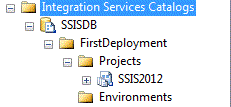
In SSIS 2012 there are two types of deployment Project based deployment and Package based Deployment. The package based deployment follows the procedure/process in SSIS 2008. The more preferred approach in SSIS 2012 would be the project based deployment. Let us say for example we have a package we need to deploy in SSIS 2012, In SQL Server Data Tools, open the SSIS project/solution and then right click on the Solution Name and choose Deploy. A Integration Services Deployment wizard opens with the list of steps that need to be completed for a successful deployment of the package. At first select the Integration Services Project that need to be deployed. In the next screen, the user is prompted for 2 pieces of information. The first one is the Server name, this would be SQL Server 2012  where the package is to be deployed. The second one is the path for the SSISDB which is the Integration Services Catalog on the SQL Server 2012.


Here if the SSISDB is not present on the server, one needs to created the SSISDB manually. This can be done in SQL Server Management Studio by right clicking on the Integration Services Catalog. Choose the New Catlog Option, the Create Catalog Window opens. In this window one needs to check the Enable CLR Integration so that the catalog can be used. By default the name of the Catalog database is set to SSISDB. There needs to be password entered for the SSISDB catalog database, the reason being the catalog protects data using encryption. Once this complete the Catalog database is complete.


Now going back to the Deployment wizard, the path to the catalog database needs to be entered, it would be something like:
/SSISDB/FirstDeployment/SSIS2012.
Once the information is completed on this screen, the choices can be reviewed in the next screen, then once we proceed to the next screen, the project is ready to deployed and one can see the progress. On successful completion of deployment one can see the package being deployed in the SSISDB catalog.


Sunday, October 28, 2012

SQL vs Hadoop, Hive...

Yesterday I had the opportunity to attend the SQL Saturday Event in Charlotte. It was a packed day with lot of topics, all of them focused on the Business Intelligence Space. For me the day started of with a session on Upgrading to SSIS 2012 by Paul Rizza From Microsoft, it was a very informative session with lots of pointers towards what needs to be looked at in SSIS 2012, I am planning to write a more detailed post on this topic later.  One of the important lectures I attended was on Hadoop vs SQL and how Hadoop can be utilised in Data Warehouses. As expected it was a packed session with folks looking forward to what is Hadoop and see what all the hype was about. Hadoop targets the unstructured data space and has mechanism to plow through the huge amounts of unstructured data that is available these days. Companies today are trying to make meaningful dissection of unstructured data and help the strategic direction of the company. The presentation was provided by Rob Kerr (CTO with BlueGranite) and it was full of valuable information. One of the differences bet ween SQL and Hadoop is that SQL follows the Schema Write methodology, meaning first the table structure or the schema is created, then data is inserted into the tables. In Hadoop the Schema Read methodology is followed meaning as the data is loaded the schema is determined at run time which allows it to tackle unstructured data. The mechanism that is followed to decipher unstructured data is that it uses the MapReduce methodology. During the Map() function the data is being assigned to different nodes by a central node, then after that Reduce() function kicks to parse the data, once the data parsing is done the data from the different nodes is sent back to the requester. The other difference between SQL and Hadoop is that SQL requires consistency and structure follows the ACID principle, Hadoop does not require the structure and focuses on data availability, Hadoop framework also processes information in a batch.

It is very much possible that both SQL and Hadoop can coexists in Datawarehouse environment. For example let us say one has a datawarehouse regarding call center data which houses all the structured information, at the same time there is lot of data captured in a call center to chats/online mechanisms. Instead of shedding away the unstructured data, one can use Hadoop to parse through the unstructured data, look for keywords that would matter to the business and store it. One can work on integrating Hadoop with the datawarehouse and get unstructured data to be fed into the Datawarehouse. To get more information about the presentation about Hadoop and SQL please use the following link:
http://msbiacademy.com/Lesson.aspx?id=108
There are other links in the above site which provide more information about Hadoop and SQL.

There a layer on top of Hadoop where in users can use sql to get information about unstructured data that is through a tool called Hive. Hive sits on top of Hadoop layer which can accept sql commands. Once the sql command is entered by the user the query is passed on to the MapReduce mechanism of Hadoop. Once hadoop receives the request and data is parsed out the result then returned back to the Hive Layer where data is presented back. Please use the following link to learn more about Hive:
https://cwiki.apache.org/confluence/display/Hive/GettingStarted

Here are some examples from the above site:

Creating Hive tables and browsing through them

hive> CREATE TABLE pokes (foo INT, bar STRING);
Creates a table called pokes with two columns, the first being an integer and the other a string
hive> CREATE TABLE invites (foo INT, bar STRING) PARTITIONED BY (ds STRING);

Tools are also getting better with the Hadoop framework which is making it better to get meaningful data out of unstructured information.

To summarise after the session I felt that i gotten better information Hadoop and how the framework can coexists with SQL and utilise the information embedded in unstructured data.